Il servizio Windows Bastion Service aiuta a rendere più sicuro l’accesso e la gestione dei server Windows fisici e virtuali fornendo un ambiente sicuro che può essere gestito attraverso un qualsiasi browser Web moderno. L’accesso alle macchine è gestito attraverso Windows Admin Center, il nuovo software di gestione che Microsoft sta sviluppando per sostituire Server Manager
Soluzioni
Windows Bastion Service

Il servizio Windows Bastion aiuta a proteggere l’accesso alle macchine Windows ospitate dovunque sulla rete Internet. Consente la connessione sia a macchine fisiche che virtuali attraverso Windows Admin Center, un software basato su browser che permette di gestire i sistemi attraverso semplici tool Web ma anche di stabilire connessioni Powershell Remote e Remote Desktop verso i computer di destinazione. Il servizio Windows Bastion non è limitato alla gestione di macchine all’interno della rete di VaiSulWeb ma consente la gestione di computer ospitati su altre reti o altri cloud, a condizione che siano raggiungibili attraverso la rete Internet.

ACCEDI ATTRAVERSO CONNESSIONI SICURE VIA BROWSER
INVECE CHE USARE I PROTOCOLLI PROPRIETARI USA UN SEMPLICE BROWSER WEB
Accedi alle tue macchine usando un software sicuro via browser per poter effettuare attività di gestione semplici o complicate. La connessione al software viene gestita attraverso HTTP e quindi il servizio Windows Bastion di solito non è limitato o bloccato dai firewall pubblici o aziendali e quindi può essere usato da qualsiasi postazione, incluso quando si è in mobilità attraverso tablet e persino smartphone a condizione che usino browser moderni. Potrai quindi limitare l’accesso di protocolli proprietari come Remote Desktop o Powershell Remoting all’indirizzo IP dedicato e migliorare la sicurezza delle tue macchine.

EFFETTUA DECINE DI ATTIVITÀ DI MANUTENZIONE
WINDOWS ADMIN CENTER TI CONSENTE DI EFFETTUARE DECINE DI ATTIVITÀ DI MANUTENZIONE
Usando Windows Admin Center sarai in grado di effettuare decine di attività di gestione attraverso una interfaccia basata sul Web semplice e ben definita. Ci sono già molti strumenti disponibili che coprono le attività più comuni: monitoraggio dello stato della macchina, file, network, registro eventi, operazioni pianificate fino alla gestione di Hyper-V e di cluster iper-convergenti. Quando non c’è uno strumento già pronto potrai avviare una sessione di Powershell Remoting o Remote Desktop per operare liberamente sulla macchina.

SERVIZIO COMPLETAMENTE GESTITO
IL SERVIZIO WINDOWS BASTION È COMPLETAMENTE GESTITO MA OFFRE AMPIE POSSIBILITÀ DI PERSONALIZZAZIONE
Il servizio Windows Bastion è completamente gestito e VaiSulWeb si prenderà cura di tutti gli aggiornamenti e di qualsiasi cosa sia necessario per mantenere il servizio attivo e funzionante. Nonostante questo, Windows Bastion è completamente configurabile. Sarai in grado di installare o disinstallare strumenti, configurarli nel modo migliore per te, aggiungere un elenco di macchine comuni a tutti gli utenti e aggiungere strumenti o aggiornarli quando saranno disponibili.
[flagallery gid=2 w=100% h=100% skin=horizon fullwindow=true]

UN AMBIENTE SICURO
WINDOWS BASTION FORNISCE UN AMBIENTE SICURO PER EFFETTUARE LA GESTIONE DELLE MACCHINE
Il servizio Windows Bastion fornisce un ambiente sicuro per effettuare le attività di manutenzione di server Windows. Le connessioni al servizio sono protette da SSL/TLS e sebbene il servizio memorizzi gli indirizzi delle macchine alle quali puoi connetterti, non memorizza però le tue password e quindi non è possibile alcuna perdita di dati che metta a rischio l’accesso alle tue macchine. Puoi anche richiedere l’attivazione del servizio con accesso WinRM su HTTPS in modo da rendere le connessioni alle tue macchine ancora più sicura. Ogni istanza però può usare un solo tipo di connessione WinRM (HTTP o HTTPS).

GESTISCI LE MACCHINE OVUQUE SIANO
PUOI GESTIRE LE TUE MACCHINE SUL NETWORK DI VAISULWEB MA ANCHE SU AZURE, AMAZON, ETC.
Non ci sono restrizioni su dove possano risiedere le macchine che vuoi gestire. Puoi usare il servizio Windows Bastion per gestire le macchine fisiche o virtuali fornite da VaiSulWeb ma puoi anche gestire le macchine su altri cloud o altre reti a condizione che possano essere raggiungibili attraverso la rete pubblica. In più, una configurazione opzionale avanzata ti può consentire di gestire attraverso Windows Bastion le tue macchine ospitate da VaiSulWeb ma non raggiungibili sulla rete Internet, una configurazione che molti clienti con infrastrutture complesse usano da noi.
MOLTE EDIZIONI DI WINDOWS DIVERSE
POTRAI GESTIRE SIA SERVER CHE CLIENT WINDOWS, FINO A WINDOWS SERVER 2008 R2
Il servizio consente di gestire sia macchine con Windows client che server. Mentre l’unica versione di Windows client supportata è Windows10, se si parla di sistemi operativi server le versioni che sarà possibile gestire sono Windows Server 2019, 2016, 2012 R2, 2012 e 2008 R2, quest’ultima con alcune limitazioni. Il servizio Windows Bastion è ideale per gestire sistemi Windows Server Core che non hanno l’interfaccia grafica installata in modo da poter effettuare molte operazioni attraverso i tool del servizio e completare le attività in modo più semplice. Se ne avrai bisogno, potrai sempre attivare una connessione diretta alla interfaccia a linea di comando usando Powershell Remoting.
Come funziona
L’accesso al servizio è protetto attraverso connessioni SSL/TLS in modo che i comandi che invii non possano essere intercettati. Il servizio è anche protetto dal nostro filtro anti-DDoS. Una volta che effettui l’accesso potrai aggiungere macchine ospitate sia all’interno che all’esterno della nostra rete. Nessuna informazione segreta è mai memorizzata all’interno del servizio, incluse le password quindi non è possibile una compromissione che esponga le tue password all’esterno.
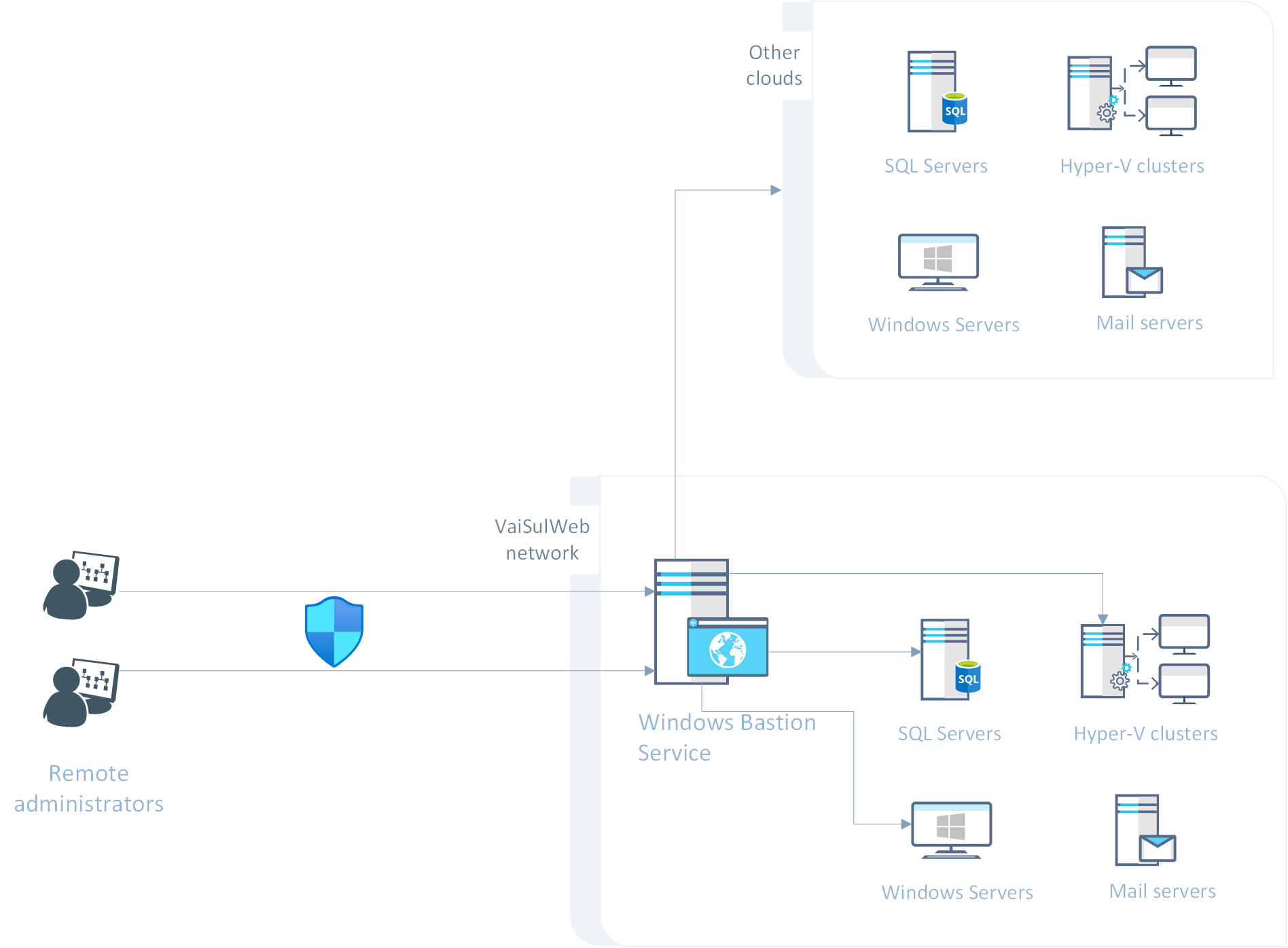
tabella prezzi
Il costo del servizio VSW Windows Bastion è basato sul numero di istanze
che devono essere attivate. Ogni istanza può gestire un numero illimitato di macchine
e supporta fino a 50 utenti indipendenti non contemporanei. I costi indicati sono IVA incl.
VSW Windows Bastion
€ 25/ mese
Accesso via Web (SSL/TLS)
Max utenti 50
Max server Illimitati
Indirizzo IP dedicato Incluso
Max traffico mensile Illimitato
Solutions
Windows Bastion Service
Windows Bastion Service helps securing the access to Internet Windows physical and virtual servers by providing a safe environment that is controlled through any modern browser. Access to servers is managed through Windows Admin Center, the new UI that Microsoft is actively developing to replace Server Manager.
Windows Bastion Service helps securing the access to Windows machines hosted everywhere on the Internet. It allows connecting to both physical and virtual servers through Windows Admin Center, a browser-based software that allows to manage Windows machines using simple tools commanded via Web but it also allows to establish Powershell Remote and Remote Desktop connections to the target server. Windows Bastion Service is not restricted to manage machines hosted inside the VaiSulWeb network but can manage machines hosted on other networks and clouds, provided that they are reachable through the public Internet network.
ACCESS VIA SECURE BROWSER CONNECTIONS
INSTEAD OF USING PROPRIETARY PROTOCOLS, JUST USE A BROWSER
Access your machines using a secure browser-based software to perform simple or complicated management tasks. Being HTTP-based, Windows Bastion Service is usually not restriced by public or corporate firewalls and thus it can be used almost anywhere, including on the go via tablets or even smartphone provided that they can use a modern browser. You can thus restrict the access to advanced protocols like Remote Desktop or Powershell Remoting to your dedicated IP address and improve security of your machines.
PERFORM TENS OF MANAGEMENT TASKS
WINDOWS ADMIN CENTER ALLOWS TO PERFORM TENS OF MANAGEMENT TASKS
By using Windows Admin Center you will be able to perform tens of management tasks through simple and polished Web-based tools. There are already many tools available that cover most common tasks: monitoring machine status, files, network, event viewer, scheduled tasks up to Hyper-V management and even hyper-converged clusters. Where you don’t have a ready-made tool you can start a Powershell Remoting session or a Remote Desktop connection to freely operate on your machine.
A FULLY MANAGED SERVICE
WINDOWS BASTION SERVICE IS A FULLY MANAGED SERVICE BUT IT OFFERS WIDE CUSTOMIZATION CHANCES
Windows Bastion Service is a fully managed service so VaiSulWeb will take care of all the updates and everything is needed to make the service run smoohtly. Yet this service is fully customizable: you will be able to install or uninstall tools and configure it the way you need, add a default list of machines that will be available to all users and install new tools or update them whenever they are available.
[flagallery gid=1 w=100% h=100% skin=horizon fullwindow=true]
A SECURE ENVIRONMENT
WINDOWS BASTION SERVICE PROVIDES A SECURE ENVIRONMENT TO PERFORM MANAGEMENT
Windows Bastion Service provides a secure environment to perform management tasks. Connections to the service is secured via SSL/TLS and while the service itself will store a list of machines to connect to, it won’t store your passwords so no data leak of sensitive access information can happen. You can also request to activate the service to connect to machines using WinRM over a HTTPS connection, thus also securing communications between the bastion and the servers to manage.
MANAGE MACHINES EVERYWHERE
YOU CAN MANAGE MACHINES ON VAISULWEB NETWORK OR ON AZURE, AMAZON ETC.
There are no restrictions about where your target machines can be hosted. You can use Windows Bastion Service to manage machines provided by VaiSulWeb but you can also manage machines on other clouds or networks, provided that they can be accessed through the public network. Moreover, an optional advanced configuration can provide access to machines hosted by VaiSulWeb but not exposed over the public network to improve security even further.
MANAGE DIFFERENT WINDOWS EDITIONS
YOU CAN MANAGE BOTH SERVERS AND CLIENTS MACHINES, DOWN TO WINDOWS SERVER 2008 R2
Windows Bastion Service allows to manage both Windows clients and servers. While supported client is Windows10 only, when it comes to servers this service can manage Windows Server 2019, 2016, 2012 R2, 2012 and 2008 R2. This is the ideal tool to manage Windows Server Core installations that provide no graphical UI so you can perform most tasks in a more streamlined way, improving your productivity for tens of common tasks while providing Powershell Remoting sessions to access the CLI.
How it works
Access to the service is secured through SSL/TLS connections so that commands sent to the service cannot be intercepted. The service is also protected by our anti-DDoS filter. Once you access the service, you can add both machines hosted inside and outside our network. No secret information is ever stored inside the service so no data leak can happen.
pricing table
Pricing for VSW Bastion Service is based on the number of instances
that needs to be activated. Each instance can manage unlimited machines and
supports up to 50 users. Prices are VAT incl.
VSW Windows Bastion Service
€ 25/ month
Accessed via Web (secure connection)
Max users Up to 50
Max machines Unlimited
Dedicated IP Included
Max monthly traffic Unlimited